Off to a new project and today I’m exploring the SharePoint Managed Metadata and Taxonomy APIs. I had created a simple Windows Form application to test with and as I was trying to read some of terms out of the Managed Metadata Service Application, I came across a weird error that took me a while to figure out.
Code Snippet:
using (SPSite site = new SPSite(siteURL))
{
   TaxonomySession session = new TaxonomySession(site);
   TermStore termStore = session.TermStores["Managed Metadata Service"];
   TermCollection terms = termStore.GetTerms(InputTerm.Text, true);
   foreach (Term term in terms)
   {
      Results.Text += term.Name + "\n";
      if (term.Terms.Count > 0)
      {
         foreach(Term childTerm in term.Terms)
         {
            Results.Text += childTerm.Name;
         }
      }
   }
}
Error Message:
ArgumentOutOfrangeException was unhandled. Specified argument was out of the range of valid values. Parameter name: index.
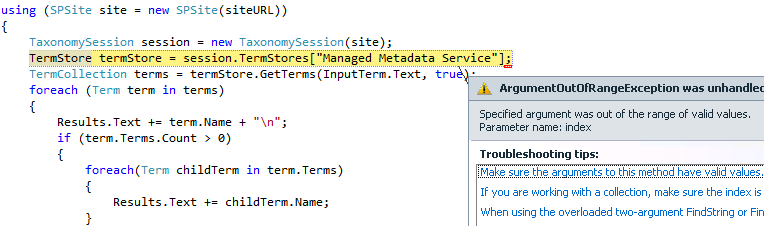
Cause:
Digging through the properties of the session object showed that it was null so for some reason I wasn’t even able to get a handle on a TaxonomySession object, which is the entry point to getting access to any of the information inside of your Managed Metadata Service. When cross-referenced with the Event Viewer, I see this message:
Event ID: 8089
Source: SharePoint Server
Task Category: Taxonomy
Level: Warning
The Managed Metadata Service 'Managed Metadata Service'
is inaccessible. The web application does not have
sufficient permissions.
Solution:
Since I was running Visual Studio and my test Windows Form application as myself (a user), I went to Central Administration to find out whether or not I had access to the service.

Lo and behold, it looks like only service accounts had access to the Managed Metadata Service. After I added my account to have at least Read Access to the Term Store, all was well and I was on my merry way again. 🙂


 The SharePoint Swiss Army Knife
I see you have ADFS Provider, does it work good?
very helpful! i must say! keep sharing good stuff! i myself work in providing SharePoint Solutions. visit us http://www.dshift.com. Share the knowledge.
Richard